

Retainers in Quanta
Run recurring retainers and prepaid hour blocks end to end. Quanta tracks the burn, drafts the fee and overage invoices on schedule, locks the billed time, and keeps client-level visibility under control.
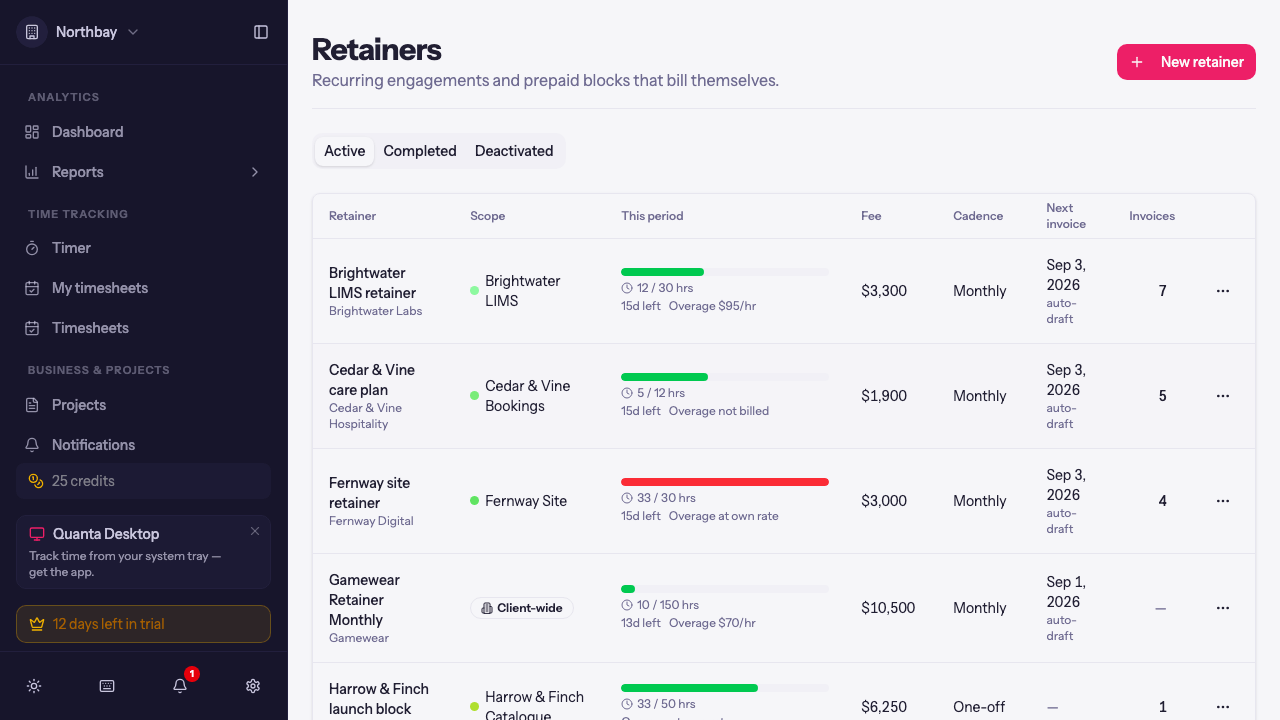
A lot of agency work isn't "track hours, send an invoice at the end of the month." It's "the client pays $4,200 every month for up to 40 hours, extra hours bill at $120, and unused hours roll into next month." Until now you could approximate that in Quanta with budgets and manual invoices, but the bookkeeping (what's included, what's overage, what's already billed) lived in your head.
Retainers move that bookkeeping into Quanta. You describe the deal once, and Quanta tracks the burn as time comes in, drafts the invoices on schedule, locks the billed time so it can't drift afterwards, and keeps a period-by-period history you can audit and even undo.
There are two shapes, and they cover most agreements we've seen:
- Recurring retainers: a fee every month or quarter, with included hours, overage rules, and optional rollover.
- One-off blocks: the client prepays a block of hours (say 25 hours for $3,000), the team draws it down, and you top it up or wrap it up when it runs dry.
The list gives you the whole book at a glance: how far each retainer is into its current period, the fee, what overage will do, and when the next invoice drafts.
Describing the deal
Retainers live under Retainers in the sidebar. New retainer opens a sheet where you describe the agreement in the client's own terms.
The important choices:
- Client and Scope. A retainer can cover a single project, or be Client-wide (all projects), which pools every project of that client into one allowance. A client can have either one client-wide retainer or per-project ones, not both at once, so hours are never counted twice.
- Draws down decides what the allowance is made of. Included hours is the classic "40 hours per period" deal. The fee, at billable rates makes it a dollar budget instead: time draws down the fee at each entry's billable value, which suits "you get $5,000 of work each month" agreements.
- Included hours per period and Fee per period. Setting included hours to 0 gives you a pure flat fee: the client pays the fee, hours are not tracked against an allowance, and nothing ever counts as overage.
- Covered people optionally narrows the retainer to specific team members. Time from anyone else on the same projects stays regular billable time and is invoiced the normal way.
- Cadence and Start date. Periods are anchored to the start date, not the calendar. A monthly retainer starting August 17 runs August 17 to September 16, then September 17 to October 16, and so on. Quarterly works the same way, three months at a time.
Then the billing behavior:
- Bill the fee either At period start (in advance), which is how most retainers are sold, or At period end (in arrears) together with any overage.
- Bill overage on its Own invoice at period end, On the next fee invoice, or Don't bill overage if extra hours are simply absorbed. Overage prices at Each person's own rate or A flat rate you set on the retainer.
- Unused hours can Expire each period or Roll over (capped). Rollover carries unused hours forward up to a Max carried hours cap, so one quiet month doesn't snowball into an unbounded bank.
- Extra recurring lines let you put fixed items like a hosting fee on every period's invoice.
- Auto-draft invoices is on by default. Quanta drafts the invoices on schedule; nothing is ever sent without you.
Payment terms and tax follow the client
You'll notice the Payment terms and Tax profile selects default to Client default. Retainer invoices inherit whatever terms and tax you've already configured on the client, resolved at the moment each invoice drafts. Change the client's tax profile and next period's invoice picks it up automatically, with no retainer edits needed. You can still pin a specific term or profile on one retainer, or mark it tax exempt, when a deal genuinely differs.
If the project isn't set up for hourly billing yet
A retainer needs billable time to draw down. If you scope one to a project that has hourly billing turned off, the form doesn't send you away to fix the project first. It handles it inline:
You set the Default billable rate, choose whether it applies to new time entries only, to all of them, or to entries after a specific date, and saving the retainer turns hourly billing on with those settings. Locked and invoiced entries are never touched. The reverse is guarded too: you can't switch billing off on a project while an active retainer depends on it.
Living with a retainer
Each retainer's page is where you watch the period unfold.
The summary cards at the top show the current period's burn against the allowance, including rolled-over hours when they apply, the fee, and when the next invoice goes out. When something needs you (a declined card, an overdue invoice, billing that hasn't run), a banner above them says so and offers the fix. The Time entries tab lists every covered entry for the period, filterable by person, project and status, and groupable by day or person. Non-billable time never draws a retainer, and the entry list hides it by default; the Status filter brings it back when you want the complete picture of where the team's week went.
Usage by period is the record of settled periods. Each row is a statement: the window it covers, the hours it used against the allowance, and chips linking to the fee and overage invoices it produced. Everything a retainer has ever billed traces back to a row here.
Billing runs itself, but you hold the pen
When a period boundary passes, Quanta closes the period: it records a statement, drafts the fee invoice (or the fee plus overage, per your settings), and locks the settled time entries so they can't be edited or double-invoiced later. Invoices always land as drafts for you to review and send.
Two buttons appear only when there's something for them to do:
- Bill overage now shows up mid-period once you're past the allowance and there are unsettled overage hours. Useful when a client blows through the hours in week one and you don't want to wait until month end to bill the excess.
- Run overdue billing appears when a period boundary has passed but hasn't been billed yet, for example if auto-draft was off. It catches the retainer up.
Both actions confirm first and spell out exactly what will be drafted and what will lock, in numbers, before you commit.
Mistakes are recoverable. Reopen undoes the most recent statement: it deletes the draft invoice it created, unlocks the entries, and puts the hours back into the open period. If the invoice has already been sent or paid, Quanta refuses to reopen. Void the invoice first, so your books and your client's inbox can never disagree.
The invoices it writes
Retainer invoices look like invoices you'd write by hand, because your client will read them.
The fee line says what it covers ("Retainer fee (15 hrs included)"), the overage line names the period it settles, and terms, tax, and currency come from the client as described above. They're regular Quanta invoices, so QuickBooks sync, PDF download, and payment tracking all work as usual.
Retainers and regular invoicing also stay out of each other's way: time covered by an active retainer won't appear in "uninvoiced time" imports on manual invoices, so you can't accidentally bill the same hour twice from two directions.
One more nicety: until you touch a drafted fee invoice, it stays in sync. Fix a typo in the retainer's name or adjust the fee before the period starts, and the untouched draft updates in place. Once a period has activity, fee changes apply from the next period, and the form tells you so.
Getting paid, automatically
Sent retainer invoices open in the client portal with the deal on them: the price, what's included, what happens beyond that, this period's usage and the retainer's other invoices, with each tax on its own line. If you've connected Stripe, your client can pay there by card.
Turn on Auto-pay for the retainer and that same invoice lets your client save the card, so every retainer invoice after it is charged when it goes out. You can review each draft before it's sent, or let a fixed-price retainer run on its own. Retainers That Pay Themselves walks through it.
Prepaid blocks
The One-off cadence turns a retainer into a prepaid block, and its page swaps the period machinery for a running ledger.
The block starts with the purchase (hours and price, drafted as an invoice), and the balance counts down as covered time comes in. When it runs low:
- Top up the block adds hours at a price you set, drafts the invoice, and extends the balance immediately.
- Wrap up block ends the engagement: remaining hours are written off, the final state is settled into the ledger, and the covered entries lock. Wrapped up too early? Undo wrap-up puts it back, and an unbilled top-up can be removed the same way.
Every purchase, top-up, and wrap-up is a ledger row with its invoice attached, so "how many hours does this client have left, and what did they pay for them" is always one glance away.
Who sees the money
Retainers are commercial terms, and not everyone on a project should see them. Visibility follows roles:
- Full retainer management (creating, editing, billing) requires the Retainers permission, which admins have.
- A project Manager sees their project's retainer with the money: fee, overage rate, invoice totals.
- A project Lead sees an hours-only view. The burn and the allowance, with fees and rates hidden. Dollar-budget retainers, which are money through and through, stay hidden from leads entirely.
- Everyone else sees nothing.
Client-wide retainers are client-level commercials, so a role on one project never reveals them with money. For the people who genuinely run the whole account, this release adds client roles: on a client's Team tab you can name Client managers and Client leads.
A client role cascades to every project of that client. A client manager acts as Manager on all of the client's projects and sees all its retainers with money, including client-wide ones. A client lead gets the same reach, hours-only. Where a person holds both a client role and a project role, the stronger one wins on that project.
Covered team members still see what they need day to day: the project page shows a retainer card with the burn, so a lead knows how much room is left before overage without ever seeing the fee.
The details that matter
The edges are where retainer tooling usually falls apart, so here's how Quanta handles the ones we sweated over:
- Rollover is capped and auditable. Carried hours appear in the period's allowance explicitly, and the cap keeps quiet months from banking forever.
- Fee timing is part of the deal's identity. Once a retainer has billing activity, you can't flip between advance and arrears billing on the same lineage; that would double-bill or skip a period. Everything else stays editable.
- Changing covered people mid-period behaves predictably. Adding someone brings their period time into scope; removing someone releases their unsettled entries back to regular billing. Settled statements are never rewritten.
- A running timer is never billed. Sweeps and locks skip entries that are still running.
- Deleting is guarded. A retainer with sent or paid invoices refuses deletion until they're voided, and a project or client with a retainer attached tells you to deal with the retainer first.
- Concurrent billing can't double-charge. Settling, topping up, and period closes are serialized per retainer, so two clicks or a race with the scheduler can't produce two invoices for the same hours.
In short
Describe the retainer once: scope, hours, fee, cadence, overage, rollover. Quanta tracks the burn, drafts the fee and overage invoices on schedule with the client's terms and tax, locks what's billed, and keeps a statement history you can reopen if something was wrong. Prepaid blocks get a ledger with top-ups and a clean wrap-up. With auto-pay, the client saves a card once and the invoices pay themselves. Client roles decide who sees the money and who sees only the hours.
Retainers are on for every workspace, so the Retainers entry is already in your sidebar and you can describe your first deal straight away. If your workspace doesn't need them, untick Retainers under Features on the General tab of Workspace Settings. The pages disappear and no new deals can be created, but retainers you already set up keep drafting their invoices.
If your agreements don't quite fit the shapes above, tell us at support@quanta.is. This feature was built from real agency retainer agreements, and we'd like to keep it that way.
— The Quanta team