Online payments
Connect Stripe so clients pay invoices online, one at a time or several at once, from the portal or the invoice email, with the payment recorded on each invoice for you.
Connect your own Stripe account and eligible invoices get a Pay button in the portal and a Pay invoice button in their emails. The client pays the balance on Stripe's checkout page, the money goes straight to your Stripe account, and Quanta records the payment on the invoice.
Connect Stripe
Go to Integrations (under Business & Projects in the sidebar) and open Stripe.
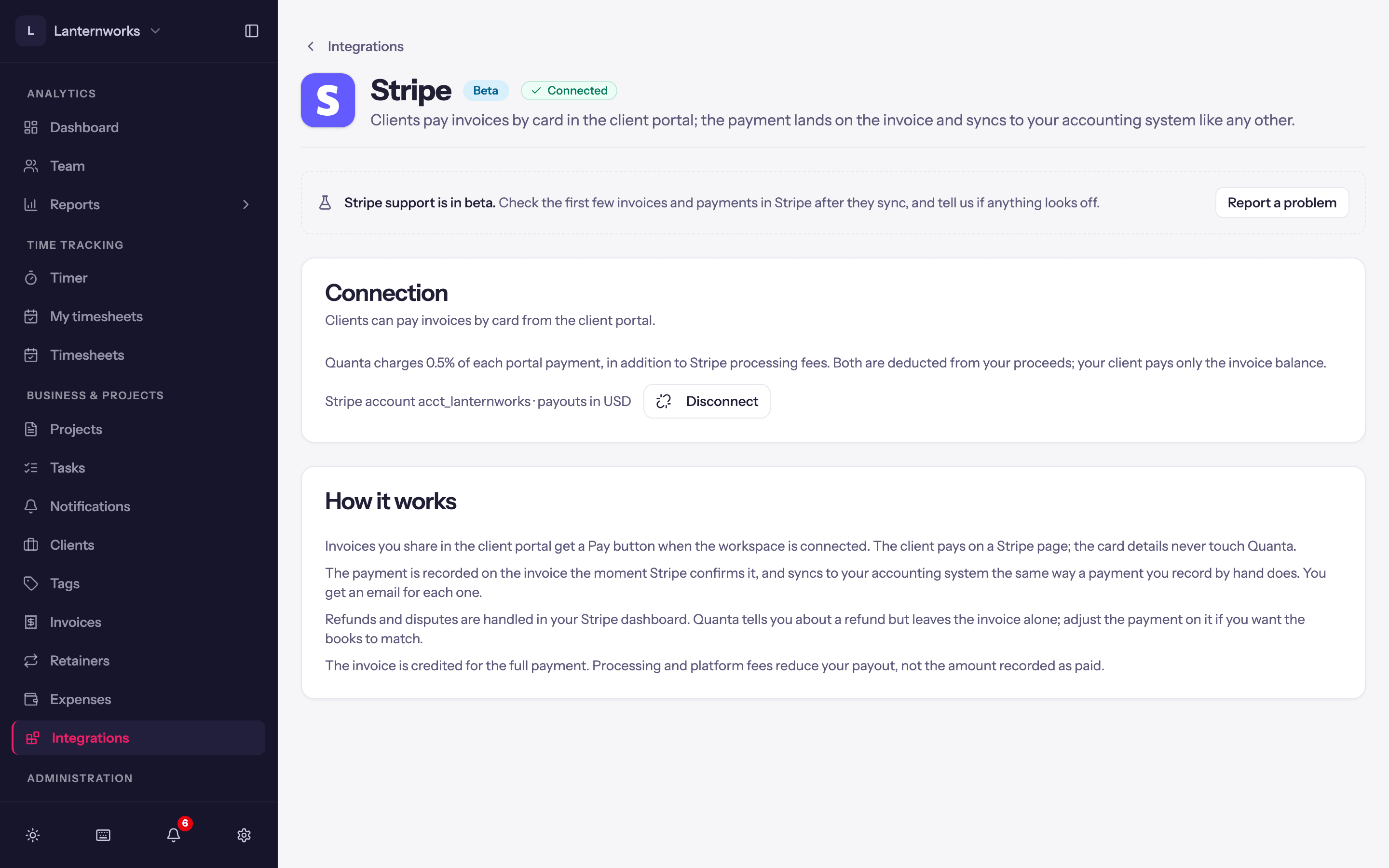
Click Connect my Stripe account to link the Stripe account you already use, or Create a new Stripe account.
Finish on Stripe and you come back to Quanta. If Stripe still needs details, the page says so and offers Finish setting up on Stripe and Check again.
Once Stripe can take payments the page shows Connected and the account's payout currency.
Connecting Stripe needs the Stripe payments permission. Disconnect removes the Pay button straight away; payments already recorded stay on their invoices and your Stripe account is not changed. If Stripe pauses payments on your account, the page shows Reconnect needed with Open Stripe to see what Stripe is asking for.
Which invoices can be paid
An invoice shows the Pay button when Stripe is connected, it has a balance, and online payment is allowed for both:
- the client: Allow this client to pay invoices online on the client's Details tab, on by default;
- the invoice: Allow online payment for this invoice on the invoice form, on by default.
Turning either off keeps the invoice viewable and downloadable, just without the button.
What the client sees
The client pays through Stripe Checkout, which lists each invoice being paid and says which taxes the amount includes. Card and bank details are entered on Stripe's page and never reach Quanta.
Paying several invoices at once
A client with more than one unpaid invoice can pay them together, like the payment page QuickBooks sends:
- in the portal, Pay invoices on the invoices card opens the pay page, and Pay on an invoice opens it with that invoice marked Viewing;
- on an invoice link (the email's Pay invoice button), the page lists the client's other unpaid invoices under the invoice.
Every invoice that can be paid starts ticked, and the Payment amount is their total. The client can untick invoices, or use Edit amount to pay less: the amount goes to the oldest due date first, so the last invoice it reaches is part paid and the rest wait for another payment. Invoices in another currency are paid separately, and an invoice that can't be paid online says why (for example Bank payment clearing).
You get one payment, recorded on each invoice it paid, and one email listing them. It syncs to QuickBooks Online as one payment against those invoices, and to Xero as a payment on each invoice.
What an invoice link shows
An invoice link lists only the invoice number, due date and balance of the other invoices, not their details. To keep each link to its own invoice, untick Let clients pay their other unpaid invoices from the link in Workspace Settings > Invoicing > Online invoices. A client can differ from the workspace: on the client's Details tab, Other unpaid invoices on invoice links is Workspace default, Show them or Don't show them. The portal always lists all of a signed-in client's unpaid invoices.
Bank payments
Stripe can also take bank payments: ACH Direct Debit from US bank accounts, and pre-authorized debits from Canadian bank accounts (Stripe lists these as ACSS Direct Debit). Switch them on in the payment methods settings of your own Stripe Dashboard. Stripe Checkout then offers them on invoices in a currency they take: USD for ACH, CAD or USD for Canadian debits.
A bank payment takes a few business days to clear, usually 3 to 5. Until then it shows on the invoice as Clearing, in your invoice's Payment History and in the client's, and the client can only pay what it doesn't cover, so nothing is paid twice. Quanta records the payment when Stripe confirms it has cleared, as a bank transfer. If the bank turns it down, nothing is recorded and the client can pay again.
Stripe can limit how large a bank payment it accepts on your account. Above that, your client sees card and the other methods only; Stripe support can tell you your limit.
What you see
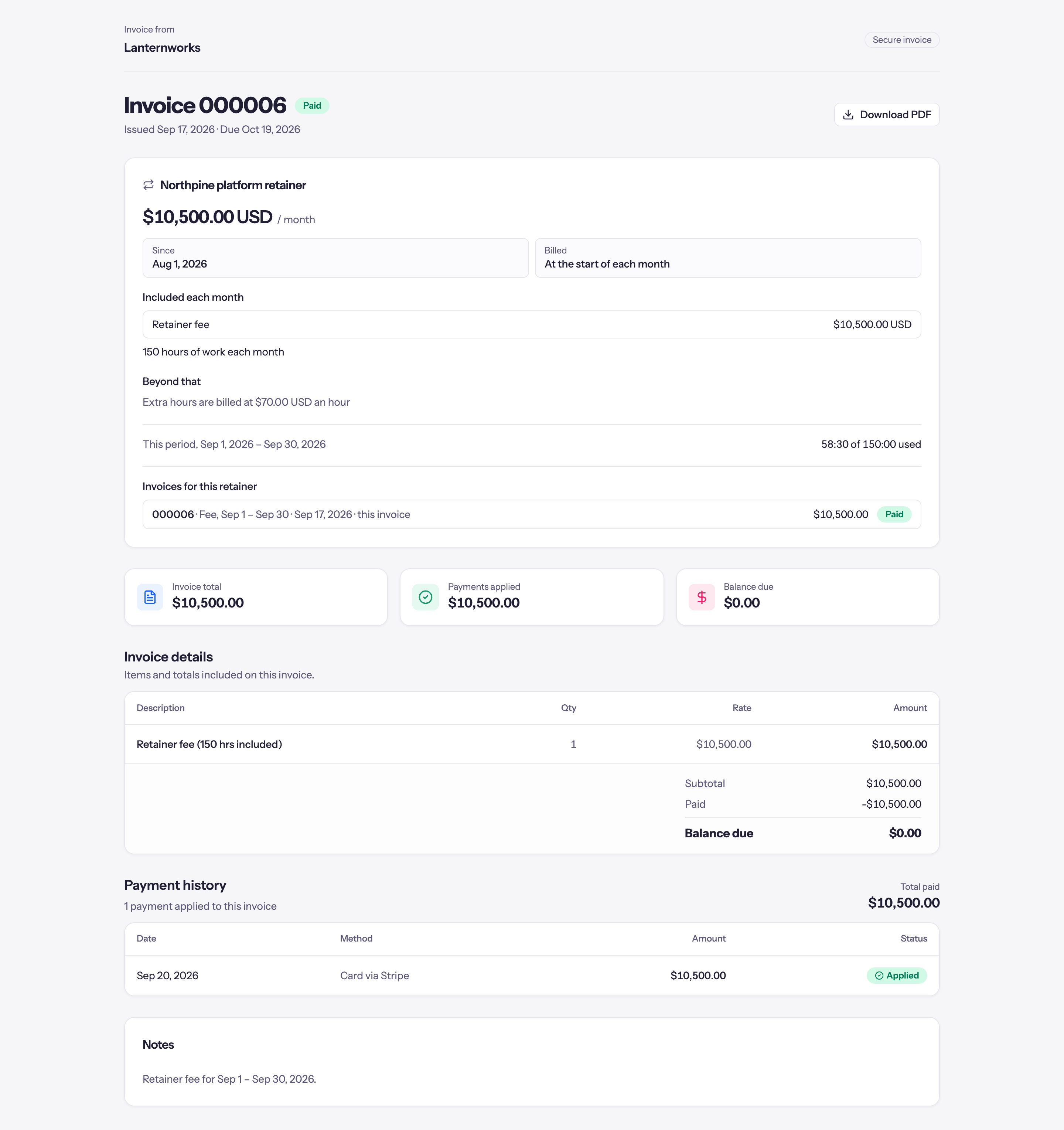
When Stripe confirms the payment, Quanta records it on the invoice (shown as Paid online), updates the balance and status, and emails your workspace. It then syncs to QuickBooks Online or Xero like a payment you recorded by hand. See Recording payments.
Refunds and disputes are handled in your Stripe dashboard. Quanta emails you about a refund but leaves the invoice alone; edit or delete the payment if you want the invoice to match.
Fees
Quanta charges 0.5% of each online payment, up to 25.00 in the payment's currency (so never more than $25 on a CAD or USD payment, however large), on top of Stripe's processing fees. Both come out of your payout. The invoice is credited with the full payment, and your client pays only the invoice balance, with no surcharge.